

Welcome to Trello Viewer for VS Code! This extension provides the following features:
- Browse Trello boards, lists and cards in the side bar.
- Add, move, or archive card.
- Add and remove user to card.
- Edit title and description of card and add comments.
- View selected card using the markdown previewer and open to the side.
- See formatted checklists and cover image for the card.
- Assign a favourite list to easily access cards.
- Saves credentials to use between sessions.
- Can filter to show only starred boards.
- Activate extension by clicking on the icon in the left Activity Bar.
- Login to trello at https://trello.com/login
- Get API key at https://trello.com/app-key
- Set credentials by clicking the key icon in the left Side Bar or running command "Trello Viewer: Authenticate".
- After entering API key, a new page should open in browser to get an API token.
- Alternatively, use the command "Trello Viewer: Set Credentials" and follow instructions from Trello to manually generate a token.
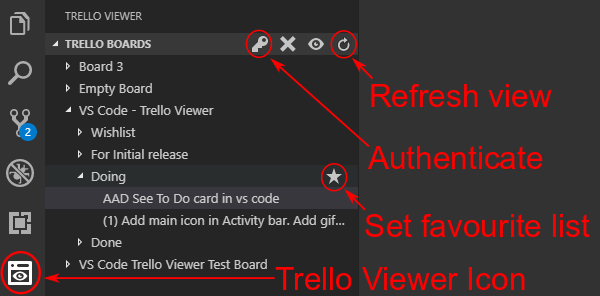
- Trello boards, lists, and cards appears in left Side Bar.
- Clicking a board or list expands or collapses object.
- Clicking a card opens the markdown file as well as the previewer, opening this to the right side (editor column 2 by default).
- Clicking on the 'star' icon to the right of a list assigns this as your "favourite list", shown in the lower part of the side bar.
- Clicking on the icons in the side bar runs various commands, such as setting credentials, removing credentials, showing saved info, and refreshing views.
- Click the 'plus' icon to add a card to the selected list.
- Right click on a card to see options for card, such as assigning a user, editing the title or description, and archive card.
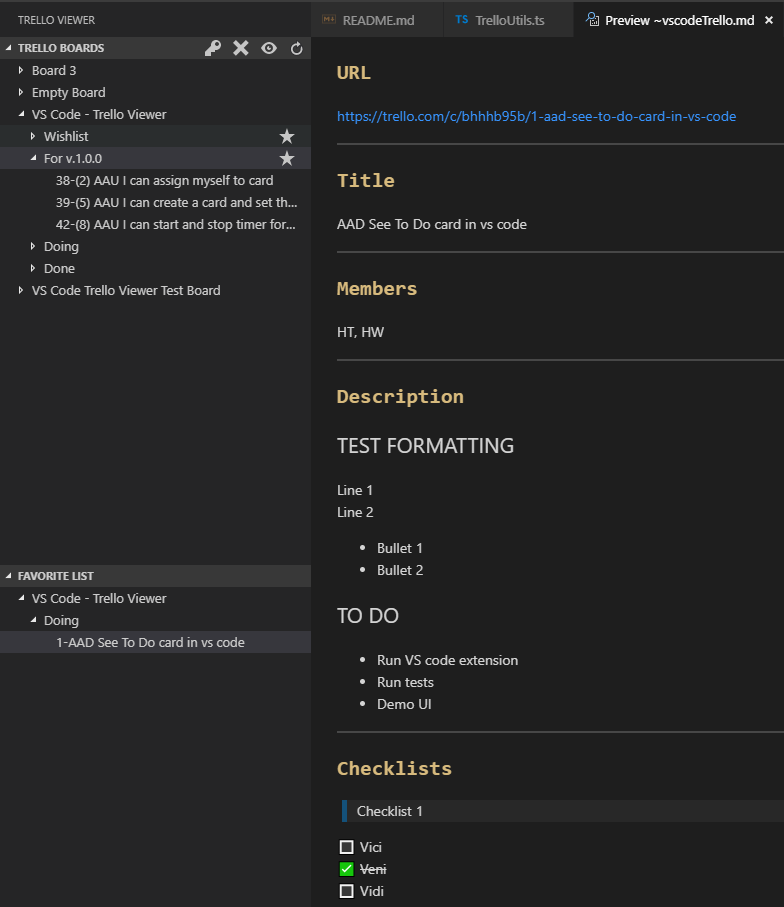
Main functionality is provided using the VS code interface in the left Side Bar. Running commands to use this extension is optional.
| Command | Description |
|---|---|
Trello Viewer: Set Credentials |
Set user Trello API key and token manually. |
Trello Viewer: Refresh |
Refresh the main Trello tree view. |
Trello Viewer: Reset Credentials |
Resets saved credentials. |
| Name of Setting | Default | Description |
|---|---|---|
trelloViewer.starredBoardsOnly |
false |
Controls whether to display starred boards only or all boards. |
trelloViewer.viewColumn |
2 |
Specifies which editor column markdown previewer opens at. |
- This extension creates a temporary file named
~vscodeTrello.mdin the user's VS Code Settings folder. - The markdown file contains parsed content of the Trello card and can be saved locally.
- Hover over any board, list or card to see the Trello ID.
- The API token is stored using AES 256 encryption with IV.
- The setting "markdown.preview.breaks" is automatically set to true to see new lines correctly formatted.