
This project is a serverless API wrapper around Google Cloud Vision using AWS API Gateway + AWS Lambda. Deployment is performed with the Serverless Framework.
Details are described in this blog post.
The API Gateway endpoint accepts an image URL and triggers a Lambda function, which ingests the image from a URL and sends the image to Google Cloud Vision for standard image recognition tasks (e.g., facial detection, OCR, etc.).
For instance, the following curl command sends an image URL to the API Gateway.
curl -H "Content-Type: application/json" -X POST \
-d '{"image_url": "https://raw.githubusercontent.com/ramhiser/serverless-cloud-vision/master/examples/images/ramhiser-and-son.jpg"}' \
https://some-api-gateway.execute-api.us-east-1.amazonaws.com/dev/detect_image
The response JSON includes a variety of metadata to describe the faces detected:
{
  "responses": [
    {
      "faceAnnotations": [
        {
          "angerLikelihood": "VERY_UNLIKELY",
          "blurredLikelihood": "VERY_UNLIKELY",
          "boundingPoly": {
            "vertices": [
              {
                "x": 512,
                "y": 249
              },
              {
                "x": 637,
                "y": 249
              },
              {
                "x": 637,
                "y": 395
              },
              {
                "x": 512,
                "y": 395
              }
            ]
          },
          "detectionConfidence": 0.98645973,
          ...
In the examples folder, we provide a script that produces a new image with
bounding boxes around the faces detected:
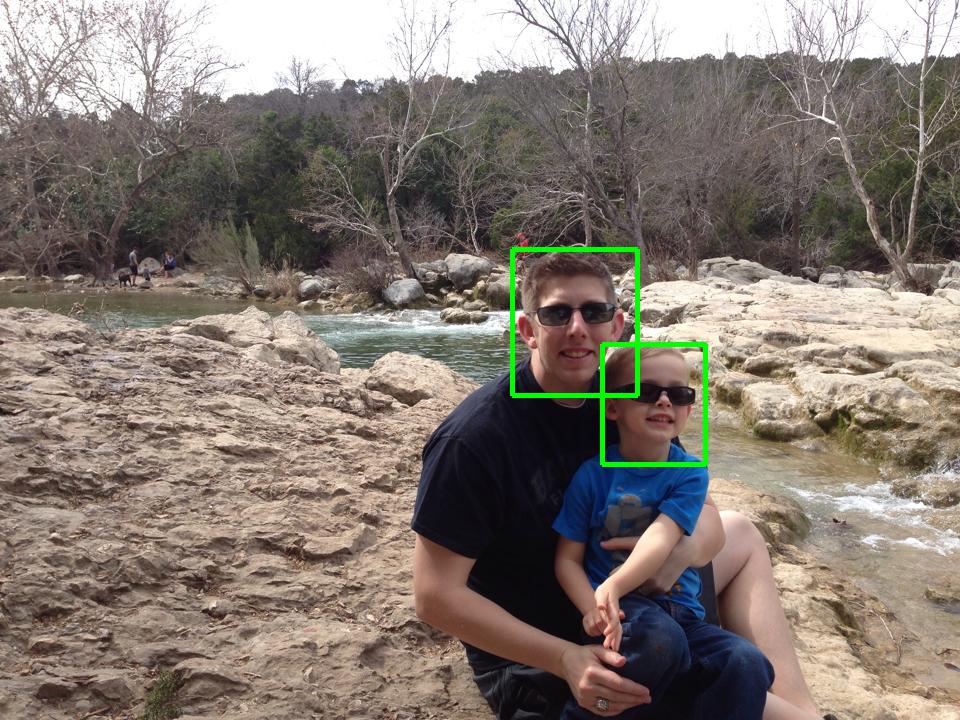
Beyond facial detection, Google Cloud Vision supports the following image recognition tasks:
LABEL_DETECTIONTEXT_DETECTIONSAFE_SEARCH_DETECTIONFACE_DETECTIONLANDMARK_DETECTIONLOGO_DETECTIONIMAGE_PROPERTIES
In order to access the Cloud Vision API, you will need to create Google
Application Credentials by following the instructions
here for
the Service Account Key. Then, download the JSON file with your application
credentials and rename the file as
cloudvision/google-application-credentials.json.
Make sure you have Node.js 4.0+ installed. Then, install the Serverless Framework.
npm install serverless -g
Install any Python dependencies to the cloudvision/vendored folder.
pip install -t cloudvision/vendored/ -r requirements.txt
NOTE: Homebrew + Mac OS users who encounter the DistutilsOptionError error
should see this SO post for a fix.
After installing Python requirements to the vendored folder, type the
following at the commandline to deploy the wrapper API:
serverless deploy
This command does the following:
- Create IAM roles on AWS for Lambda and API Gateway
- Zips Python code and uploads to S3
- Creates AWS Lambda function
- Creates API Gateway endpoint that triggers AWS Lambda function
Example Python scripts are available in the examples folder. These examples
require that the API (described above) be successfully deployed. As mentioned by
Chris Cooper, the
Python dependencies must be installed locally in order to run the examples. To
do this, type the following locally:
pip install -r requirements.txt